CodeTwo Outlook Attachment Reminder1.1.0
Publisher Description
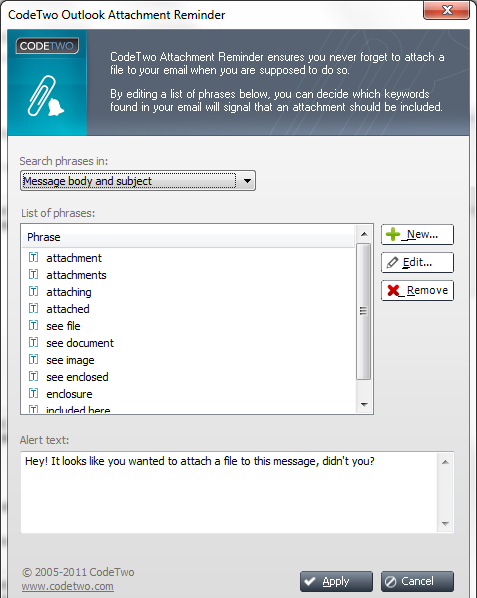
CodeTwo Outlook Attachment Reminder is a free Microsoft Outlook add-on that alerts you when it seems that you have forgotten to attach a file to your message and unfortunately pressed the Send button.
The program quickly scans a content of your e-mail and if it finds predefined expressions, such as e.g. 'see file', 'attachment', it categorizes the message as the one that possibly needs to include an attachment. The list of phrases can be easily modified and new keywords can be added. You can also decide if the program should scan message content, subject or both.
CodeTwo Outlook Attachment Reminder has a message history feature that ensures that only your message is scanned - it does not filter keywords of a received e-mail or quoted text.
Sending messages without appropriate files may cause a lot of confusion and delays. The new program from CodeTwo has been released to help Outlook users avoid such situations. It is light and fast and can be downloaded from CodeTwo's website for free. Once it is saved to your computer, you just have to run the installer and follow the wizard - there is nothing complicated about this process. After a few seconds you can find the program added to your Outlook's ribbon and enjoy the friendly reminders.
About CodeTwo Outlook Attachment Reminder
This Other Email Tools program is available in English, German, Polish. It was last updated on 29 September, 2026. CodeTwo Outlook Attachment Reminder is compatible with the following operating systems: Windows.
The company that develops CodeTwo Outlook Attachment Reminder is CodeTwo. The latest version released by its developer is 1.1.0. This version was rated by 6 users of our site and has an average rating of 2.3.
The download we have available for CodeTwo Outlook Attachment Reminder has a file size of 13.6 MB. Just click the green Download button above to start the downloading process. The program is listed on our website since 2011-09-21 and was downloaded 189 times. We have already checked if the download link is safe, however for your own protection we recommend that you scan the downloaded software with your antivirus. Your antivirus may detect the CodeTwo Outlook Attachment Reminder as malware if the download link is broken.
How to install CodeTwo Outlook Attachment Reminder on your Windows device:
- Click on the Download button on our website. This will start the download from the website of the developer.
- Once the CodeTwo Outlook Attachment Reminder is downloaded click on it to start the setup process (assuming you are on a desktop computer).
- When the installation is finished you should be able to see and run the program.
Program Details
System requirements
Download information
Pricing
Version History
version 1.1.0
posted on 2011-09-21
New features: Bulk adding of phrases; automatic detection of regular expressions; new welcome window.
Fixed: Improved work with the phrase list; introduced small text changes.
version 1.0.0
posted on 2011-06-20
This is a first release of the program.
